
Smart Speakers, Smart Displays, and Voice Assistants: Understanding the Differences

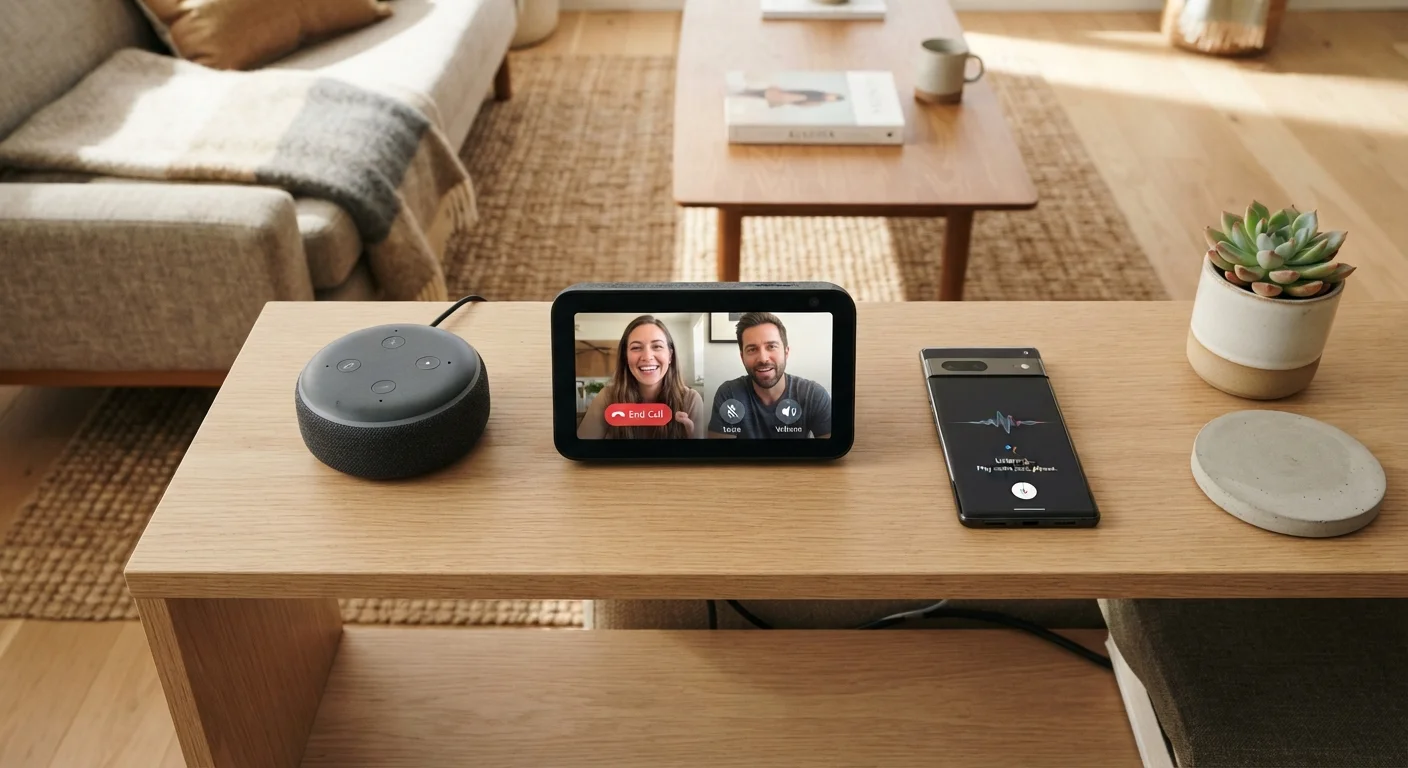
Key Takeaways
- Smart speakers are audio-only devices that respond to voice commands through a built-in assistant.
- Smart displays add a touchscreen to the smart speaker experience, enabling video calls, visual search results, and streaming.
- Voice assistants are the software layer - they can run on speakers, displays, phones, TVs, and more.
- Each device type has different setup requirements, privacy considerations, and ideal use cases.
- Understanding these differences helps you choose the right device for each room and task.
Voice-Enabled Home Devices
Voice-enabled home devices are gadgets you control by speaking to them. They use a built-in voice assistant - software that recognizes spoken commands - to answer questions, control smart home gear, play media, and more. The three main categories are smart speakers, smart displays, and devices with embedded voice assistants.
Voice assistants run on cloud-based natural language processing (NLP) engines, meaning most commands are processed on remote servers rather than entirely on the device itself.
Smart Speakers: Voice-First, Audio-Only
A smart speaker is a wireless speaker with a built-in microphone array and a voice assistant. You place it in a room, plug it in, connect it to your Wi-Fi, and interact with it entirely through conversation and sound. There is no screen.
Common tasks smart speakers handle well include:
- Playing music, podcasts, or radio stations by voice command
- Setting timers and reminders
- Answering factual questions (weather, unit conversions, general knowledge)
- Controlling compatible smart home devices like lights, thermostats, and locks
- Making hands-free phone calls through a linked account
Because smart speakers are audio-only, they work best in rooms where you don't need visual feedback - a kitchen counter, a bedroom nightstand, or a bathroom shelf. Setup is straightforward: download the companion app for your assistant ecosystem, connect to Wi-Fi, and the device is ready to use. No hub or additional hardware is required for most basic functions.
Start With One Room, One Device
If you're new to voice-enabled devices, setting up a single smart speaker in a high-traffic room - like the kitchen - is a low-risk way to learn how your chosen assistant works. Once you're comfortable with the ecosystem, expanding to a smart display or additional rooms is much easier. Trying to set up multiple devices and ecosystems simultaneously can lead to confusion during the initial learning curve.
For a broader look at how these devices fit into a larger home network, see our guide on home tech basics for beginners.
Smart Displays: A Screen Changes Everything
A smart display is essentially a smart speaker with a touchscreen attached. Everything a smart speaker can do, a smart display can do - but it layers on visual capabilities that fundamentally change the experience.
That screen enables things like:
- Video calling, where both parties can see each other
- Step-by-step recipe cards with photos while you cook
- Live feeds from compatible security cameras
- Visual search results, weather maps, and calendar views
- Streaming video content from supported services
35%
U.S. adults who own a smart speaker
According to Pew Research Center survey data, roughly one-third of American adults report owning a smart speaker, reflecting how mainstream these devices have become.
3+
Avg. voice-enabled devices per smart home household
Industry research from Parks Associates has indicated that households actively using smart home technology tend to own multiple voice-enabled devices across different rooms.
Smart displays are better suited for common areas where people gather - a kitchen island, a home office desk, or a living room side table. They require the same Wi-Fi setup as a smart speaker but generally draw more power and occupy more counter space. The touchscreen also means you can interact without speaking, which is useful in quiet settings.
One consideration: smart displays are typically more expensive than comparable smart speakers, and the screen adds a privacy dimension. Some users choose to physically cover or mute the camera when it isn't in use. Before expanding your setup, our smart device planning checklist can help you think through placement and privacy settings ahead of time.
Voice Assistants: The Software Behind the Devices
The voice assistant is not a device - it is software. Platforms like Alexa (from Amazon), Google Assistant, and Siri (from Apple) power the intelligence inside smart speakers and displays, but they also run on smartphones, tablets, smart TVs, car infotainment systems, and more.
Understanding this distinction matters for a few practical reasons:
- Ecosystem compatibility
- Each assistant integrates most smoothly with other products from the same company or certified partners. Mixing ecosystems is possible but can create friction when one assistant can't directly control a device designed for another.
- Feature parity varies by hardware
- The same assistant running on a budget speaker versus a premium smart display offers noticeably different capabilities - the assistant's intelligence is the same, but what it can display or control depends on the device.
- Privacy settings are platform-specific
- Each assistant platform has its own controls for managing voice history, data storage, and microphone access. These are managed through the companion app, not the device hardware itself.
“The most important thing for consumers to understand is that the assistant is the brain and the speaker or display is just the body. You can upgrade the body without changing the brain - and that distinction shapes every purchase decision.”
— Consumer Technology Association Research Team, Industry trade body focused on consumer electronics trends
To go deeper on how voice assistants process what they hear, our explainer on how smart speakers actually listen covers the mechanics in plain language. And if you're just getting started with home technology overall, our smart home setup guide for first-timers explains how all the pieces fit together.
For quick definitions of terms you'll encounter during setup - like NLP, wake word, or local processing - the home tech glossary is a useful reference to keep open alongside this article.