

Key Takeaways
- LCD is the foundational panel technology; OLED and QLED build on or depart from it in different ways.
- OLED pixels generate their own light, enabling true blacks and superior contrast in dark rooms.
- QLED uses quantum dot filters to enhance color and brightness on an LCD base.
- No single technology is objectively superior - the best fit depends on your viewing environment and habits.
- Panel type is just one factor; resolution, refresh rate, and processing also shape picture quality.
Our Verdict
OLED, QLED, and LCD each describe a fundamentally different approach to producing light and color on a screen. OLED excels at contrast and dark-room viewing, QLED tends to perform well in bright rooms with high-color content, and traditional LCD remains a widely available and capable baseline. None is universally 'best' - your environment and viewing preferences matter most.
| Best for | Recommended |
|---|---|
| Dark room viewers who prioritize contrast and cinematic image quality | OLED |
| Bright living rooms and viewers who want vivid color at high brightness | QLED |
| Those seeking a capable, widely available display technology | LCD |
Start With LCD: The Baseline for Most TVs
The vast majority of flat-panel televisions - including many marketed under fancier names - are built on LCD (Liquid Crystal Display) technology. Understanding it first makes everything else easier.
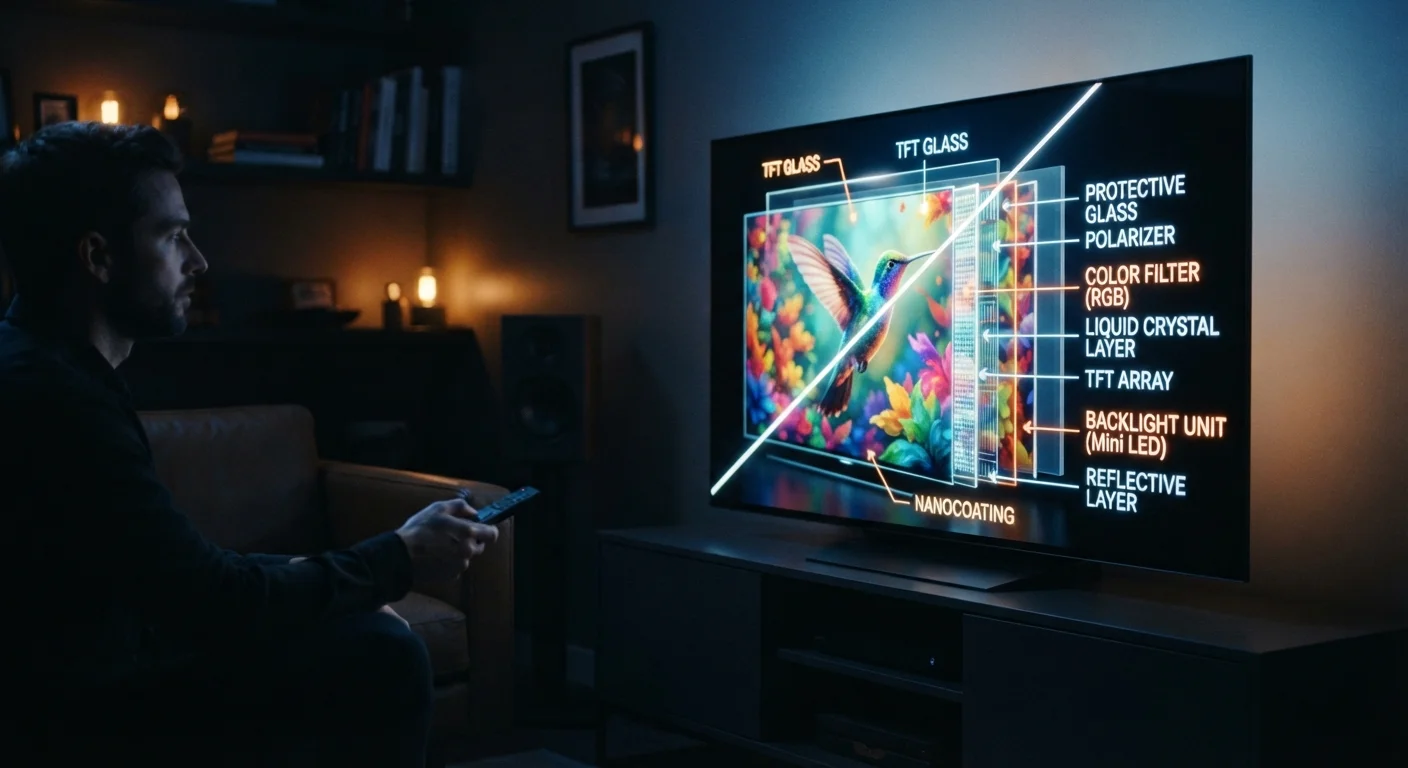
An LCD panel works by sandwiching a layer of liquid crystals between two glass plates. The crystals themselves don't produce light; instead, a separate backlight (typically an array of LEDs) shines through them. The crystals act like microscopic shutters, twisting to let light pass through or blocking it, with color filters layered on top to produce the image you see.
This architecture has some trade-offs. Because the backlight is always on, achieving a truly deep black is difficult - the panel can only block most of the light, not all of it. This is why LCD screens can look slightly washed out in dark scenes, especially in a dim room. That said, modern LCD panels with full-array local dimming - where the backlight is divided into zones that can be independently brightened or dimmed - have narrowed this gap considerably.
If tech terminology like these feels unfamiliar, our Home Tech Glossary breaks down common setup and display terms in plain language.
QLED: Quantum Dots on an LCD Foundation
QLED stands for Quantum Light-Emitting Diode - but don't let the name mislead you. Most QLED televisions are still LCD displays at their core. The key difference is the addition of a quantum dot layer.
Quantum dots are microscopic semiconductor particles that, when struck by light, re-emit it at a very precise wavelength. In practical terms, this means the backlight's white LEDs pass through a quantum dot film, which converts the light into purer red, green, and blue wavelengths before it reaches the liquid crystal layer. The result is a wider color gamut and higher brightness potential compared to standard LCD.
QLED panels tend to perform well in bright environments - sunlit living rooms, for instance - because their high peak brightness can punch through ambient light. The underlying backlight-plus-crystal structure still applies, however, so deep blacks remain a challenge relative to self-emissive displays.
| LCD | QLED | OLED | |
|---|---|---|---|
| Light source | LED backlight | LED backlight + quantum dot layer | Self-emissive pixels (no backlight) |
| Black level / contrast | Moderate (backlight always on) | Moderate to good (local dimming helps) | Excellent (pixels turn fully off) |
| Peak brightness | Moderate | Generally high | Moderate to high (varies by model) |
| Color accuracy | Good | Very good (quantum dot enhancement) | Very good to excellent |
| Bright room performance | Adequate | Strong | Can wash out at high ambient light |
| Burn-in risk | None | None | Low but possible with static content |
| Typical use case fit | General everyday viewing | Bright rooms, sports, gaming | Dark rooms, cinematic content |
OLED: Every Pixel Is Its Own Light Source
OLED (Organic Light-Emitting Diode) is a fundamentally different architecture. Each pixel in an OLED panel contains organic compounds that emit light on their own when electricity passes through them. There is no separate backlight.
This has one immediately meaningful consequence: when a pixel needs to display black, it simply turns off completely. True blacks, essentially infinite contrast ratios, and no light bleed from surrounding areas are all possible. This makes OLED panels particularly strong in dark or controlled-light viewing environments - movie rooms, evening viewing, and cinematic content all benefit.
The trade-offs are real, though. OLED panels can struggle to reach the same peak brightness as high-end QLED screens, which may matter in very bright rooms. There is also the concept of burn-in - where static elements (like a news ticker or channel logo) displayed at high brightness for extended periods can leave a faint permanent impression on the screen. Modern OLED TVs include features to mitigate this, but the risk is worth understanding before you decide.
Test in Your Actual Viewing Conditions
Showroom floors are typically very bright, which can make high-brightness panels look more impressive than they will in your home. If possible, ask a retailer to dim the ambient lighting so you can evaluate how the panel handles dark scenes - that's often where the real differences between technologies become apparent. Your typical viewing environment is the most reliable guide.
Just as food labels require some literacy to decode - something our nutrition label guide illustrates - TV panel labels reward a little background knowledge before you commit.
What Actually Matters for Your Viewing Experience
Panel type is one piece of a larger picture. A few other factors shape what you'll actually see day to day:
- Viewing environment: A bright, window-filled room favors high-brightness panels. A darker home theater setting is where OLED's contrast advantage shows up most clearly.
- Content type: Sports and gaming with lots of motion may prioritize refresh rate (measured in Hz) over panel type. Cinematic content often benefits most from contrast and color accuracy.
- Refresh rate and processing: A 120Hz panel refreshes the image twice as often as a 60Hz one, reducing motion blur. The TV's internal processor also affects how content is upscaled, sharpened, and color-corrected. These factors exist independently of whether the panel is LCD, QLED, or OLED.
- Screen size and viewing distance: At typical living-room distances, panel subtleties may matter less than you expect - though larger screens make differences more visible.
For more context on how your TV interacts with what you're streaming, see our explainer on how streaming devices deliver content to your screen. And if you're comparing display specs alongside phone purchases, our cell phone glossary covers overlapping terms like refresh rate and resolution in plain language.
~8 million
OLED TV units shipped globally in a recent year
According to industry analyst estimates, global OLED TV shipments have grown steadily as manufacturing costs have declined.
1,000-2,000+ nits
Peak brightness range for high-end QLED panels
High-brightness QLED displays can exceed 1,000 nits of peak brightness, which helps maintain image clarity in sunlit rooms.